I looooove efficiency. I love it so much that I have wondered more than once why I didn’t become an engineer. Very little can boost my mood as much as quickly as streamlining a process that used to contain redundancies and inefficiencies. I nearly cried when our city finally, FINALLY got single-stream curbside recycling.
I’m not an expert at digital organization by any means, but I thought I’d share a couple of programs and systems I found that work well for me and make tasks more efficient so I can spend my time on more valuable things like, um, teaching my dogs useless tricks and watching Azerbaijani lifestyle vlogs….
- Cloud storage. After I lost a good chunk of my dissertation in a Tragic Filesaving Accident, I became a maniac about backing up my data. My files always live in 3 places, minimum: on my laptop or PC, on an external back-up hard-drive, and in the Cloud. For Cloud storage, I use Dropbox for home files and a system provided by my university for work files. Both apps live on my laptop and home PC, and Dropbox has apps for smartphones/tablets as well, so I can get to all my files no matter where I am. I have my phone set to automatically back up photos to Dropbox when I sync to my computer. I used to waste a lot of time (and sometimes accidentally delete stuff!) moving files around from machine to machine or trying to remember where I’d saved a particular file. Those problems are gone, at least for the time being.
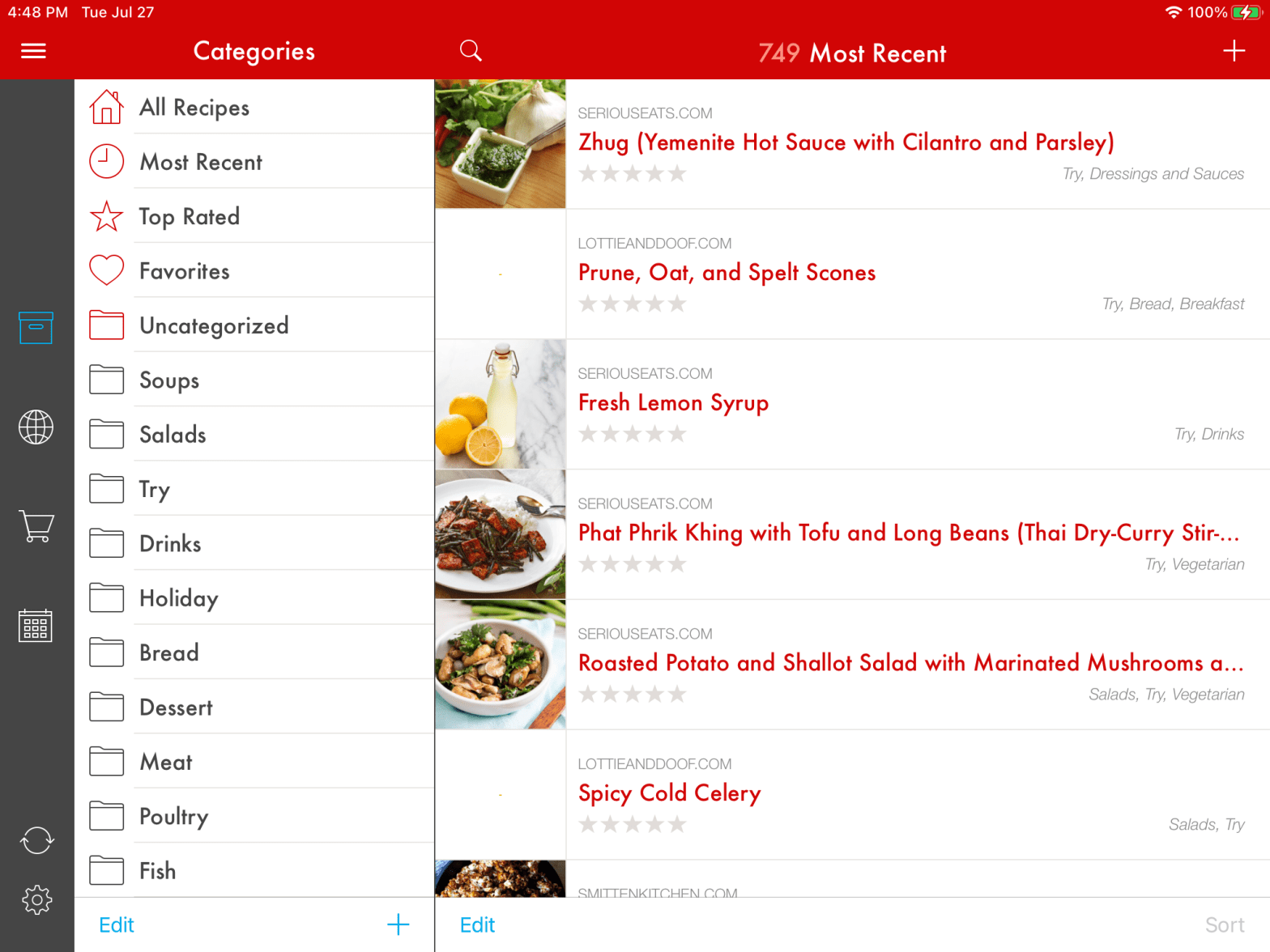
- Recipe management. I have a good-sized cookbook collection plus about 800 additional recipes. I cannot say enough good things about Paprika for managing digital recipes. I just have it on my iPad, but you can pay for an additional app for a smartphone as well if you need your recipes on multiple devices: I just stand my iPad up in its keyboard while I’m cooking and read the recipe off the screen; you can set times and cross off ingredients and steps as you cook that way as well. You can categorize recipes (see the screencap above) as well as search by keywords. You can type in your own recipes or download them very easily from most Internet recipe sites. But the pièce de resistance IMHO is the grocery cart: you fill your cart by tapping through the ingredients list of a recipe you want to make, or you can load a saved pantry list. THEN, the app breaks down the cart by aisle of the grocery store and sends it to your phone so you can walk through the store checking off items as you go! It literally reduced my weekly menu/list preparation from 1.5 hours to .5 hours.
- News curation. The Internet is both huge and hugely depressing. So, I strictly curate the news I let into my eyeballs every day. I literally read 2 news sites: the New York Times and Feedly. Feedly is a news aggregator that organizes stories from your favorite sites into a visually clean feed that’s easy to browse. If you fall behind, it’s simple to clear your cache. I like saving interesting articles into the Read Later file, and then I have a stock of entertaining things to look at while waiting at the doctor’s office, etc.
 The Rookery
2 thoughts on “Digital Organization Tips”